How to add a payment method to Meta Business Agent | WOZTELL
This article explains how to add a payment method to your business portfolio in Meta Business Suite and use it with your Meta Business Agent account. By adding the payment method to the portfolio, you can manage all your Meta billing details in one place.
Contents
1. Before you begin
Only people with full control of the business portfolio or with access to manage finance can change the payment methods connected to the portfolio.
Payment methods are added at the business portfolio level. Once added, you can assign them to the accounts in the portfolio, such as your Meta Business Agent account.
2. Add a payment method to your business portfolio
- Go to Settings in Meta Business Suite.
- In the left menu, click Billing & payments.
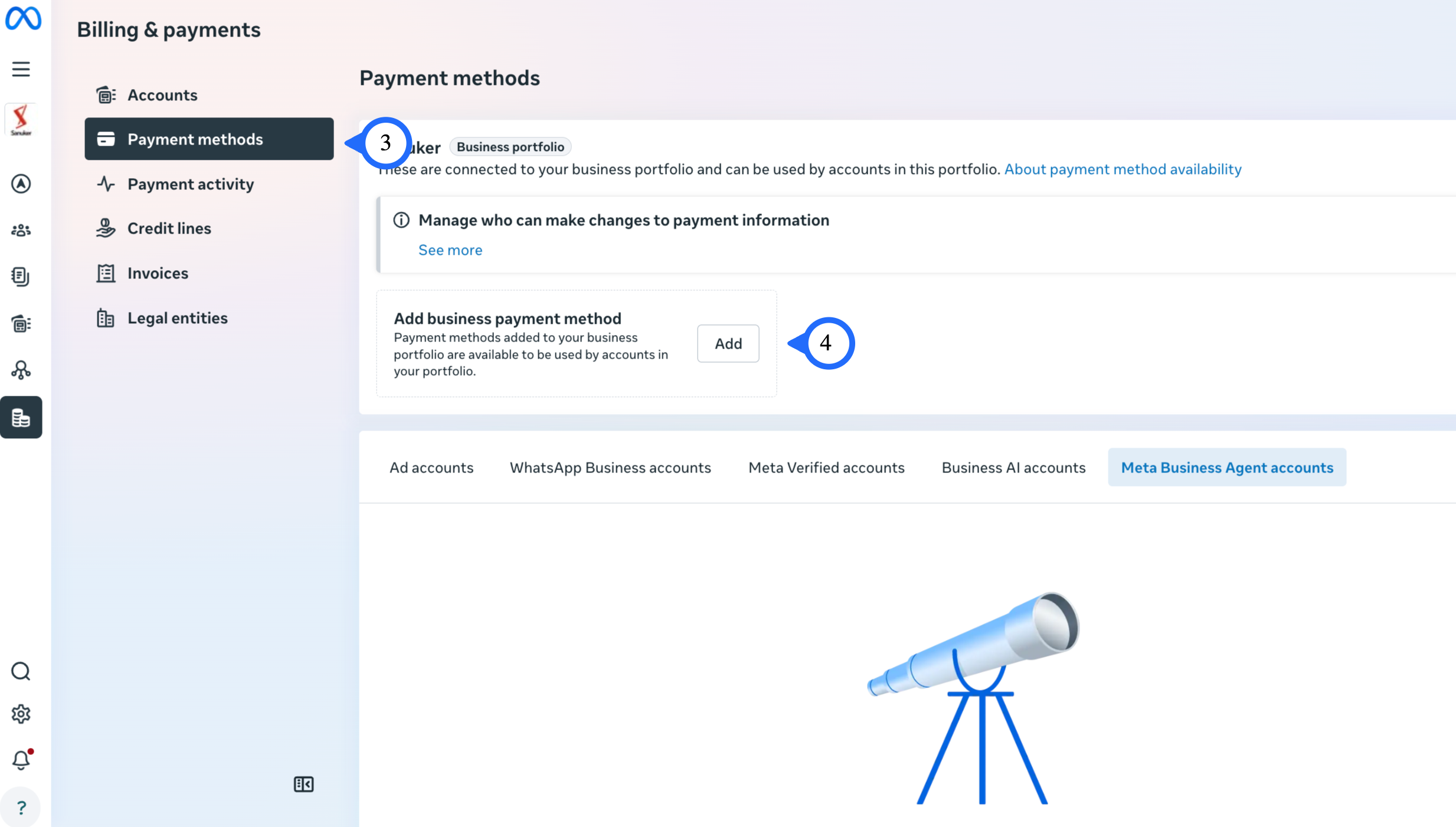
- In the left menu, click Payment methods.
- Click Add, next to Add business payment method.
- Enter your payment information: Country/region, Currency and Payment method.
- Click Next and follow the instructions to add the payment method.
You can also go directly to Payment methods from business.facebook.com/latest/billing_hub/payment_methods/.
3. View account details
- In Billing & payments > Accounts, select the Meta Business Agent accounts tab.
- Click View details to see the account's billing information.
5. Billing through WOZTELL
If you prefer WOZTELL to bill your Meta charges instead of adding your own card, email support@woztell.com.